
diff options
| author | Pliable Pixels <pliablepixels@gmail.com> | 2017-09-21 14:31:10 -0400 |
|---|---|---|
| committer | Pliable Pixels <pliablepixels@gmail.com> | 2017-09-21 14:31:10 -0400 |
| commit | 02380f39ae23045318556ed975809adbd0160fe0 (patch) | |
| tree | c0dd009210543b224c781da5c94644f71d0783fa /README.md | |
| parent | b28028ac4082842143b0f528d6bc539da6ccb419 (diff) | |
added other files, also fixed xwalk
Diffstat (limited to 'README.md')
| -rw-r--r-- | README.md | 84 |
1 files changed, 68 insertions, 16 deletions
@@ -1,26 +1,78 @@ -Ionic App Base -============== + -A starting project for Ionic that optionally supports using custom SCSS. +[zmNinja website](http://pliablepixels.github.io) -## Using this project +zmNinja is a multi platform (iOS, Android, Windows Desktop, Mac Desktop, Linux Desktop) client for ZoneMinder users. +[ZoneMinder](http://www.zoneminder.com) is an incredible open source camera monitoring system and is used +by many for home and commercial security monitoring. -We recommend using the [Ionic CLI](https://github.com/ionic-team/ionic-cli) to create new Ionic projects that are based on this project but use a ready-made starter template. -For example, to start a new Ionic project with the default tabs interface, make sure the `ionic` utility is installed: +<a href="https://itunes.apple.com/us/app/zmninja-pro/id1067914954?mt=8"><img src="http://www.pbase.com/arjunrc/image/162132546/original.jpg" width="200px" alt="Get in on App Store"></a> +<a href="https://play.google.com/store/apps/details?id=com.pliablepixels.zmninja_pro&hl=en&utm_source=global_co&utm_medium=prtnr&utm_content=Mar2515&utm_campaign=PartBadge&pcampaignid=MKT-Other-global-all-co-prtnr-py-PartBadge-Mar2515-1"><img alt="Get it on Google Play" src="https://play.google.com/intl/en_us/badges/images/generic/en-play-badge.png" width="200px"/></a> -```bash -$ npm install -g ionic cordova -``` +**Problems running zmNinja? Check out the [FAQ](https://github.com/pliablepixels/zmNinja/wiki/FAQ)** -Then run: -```bash -$ ionic start myProject tabs --type=ionic1 -``` +Video Demo +------------- +Check out a video demo of zmNinja [here](https://youtu.be/prtA_mv68Ok) -More info on this can be found on the Ionic [Getting Started](https://ionicframework.com/getting-started) page and the [Ionic CLI](https://github.com/ionic-team/ionic-cli) repo. +Mobile Platforms +--------------------------- +zmNinja is stable as of today and runs on a variety of Android and iOS platforms. +See links above to get them on play store (Android) and app store (iOS) + +It also runs on the desktop (see below) + +Desktop Platforms +----------------- +Please download binaries for Win 7, Linux or Mac from [here](https://github.com/pliablepixels/zmNinja/releases). +Please make sure you download the correct ZIP file (32/64 bit) + + +Key Features (just watch the video already) +-------------------------------------------- +* Push Notifications for alarms (Needs the [eventserver](https://github.com/pliablepixels/zmeventserver) to be set up) +* Multiple languages (English, French, German, Spanish, Portugese, Dutch, and more) +* H264 video branch support +* live views of monitors +* Montage view (with multiple montage profile settings/sizes) +* Events history and list +* Timeline view +* Camera pan/tilt/zoom (needs to have ZM support it first) + +Thanks +------ +To the zonemider community in general, and the awesome Stack Overflow community. +But specifically, [Andrew Bauer](https://github.com/knnniggett) (knnniggett) who egged me on to take up this project. + +Important Notes +--------------- +* zmNinja needs APIs enabled in ZoneMinder. If you are running ZM 1.29 or above, APIs should automatically be available. See [this](https://github.com/pliablepixels/zmNinja/wiki/Validating-if-APIs-work-on-ZM) for instructions on how to make sure your APIs are working. If they are not working, zmNinja **will not** work. + +Before you ask for help +----------------------- +* Make sure you have read the [FAQ](https://github.com/pliablepixels/zmNinja/wiki/FAQ) +* Make sure you have [validated](https://github.com/pliablepixels/zmNinja/wiki/Validating-if-APIs-work-on-ZM) that your APIs are working (if not, its a ZM issue, please post in ZM forums) +* Please don't ask me for help with source compilation if you are not familiar with coding mobile apps - you should try and solve your own problems + + +Objective +---------- +I wanted to learn how to write a mobile app. It was (and is) fun. + +Running from source +---------------------- +Please follow [these](https://github.com/pliablepixels/zmNinja/wiki/Running-zmNinja-from-Source) instructions. + + +Screenshots: +------------ + + +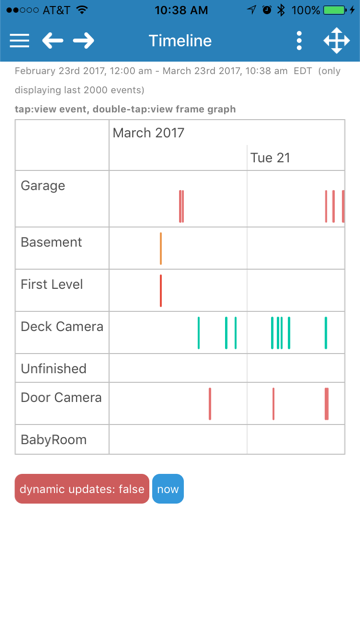 +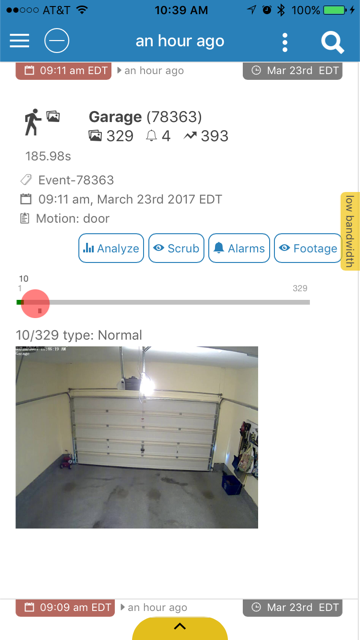 + +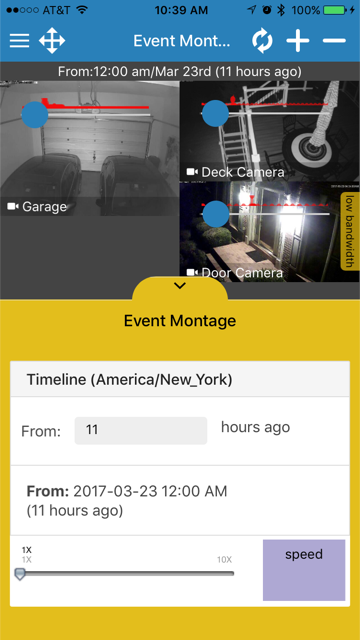 -## Issues -Issues have been disabled on this repo. If you do find an issue or have a question, consider posting it on the [Ionic Forum](https://forum.ionicframework.com/). If there is truly an error, follow our guidelines for [submitting an issue](https://ionicframework.com/submit-issue/) to the main Ionic repository. |