angular-awesome-slider [](http://badge.fury.io/js/angular-awesome-slider) [](https://travis-ci.org/darul75/angular-awesome-slider) [](https://sourcegraph.com/github.com/darul75/angular-awesome-slider) [](https://gitter.im/darul75/angular-awesome-slider?utm_source=badge&utm_medium=badge&utm_campaign=pr-badge&utm_content=badge)
=====================
Angular directive slider control.
**No JQUERY dependency needed anymore**
**Skins available**
Why
-------------
Original implementation provides very nice features but too much for my needs, this one just simplified.
Source files were divided in several files, and not angular integrated.
Screenshot
-------------
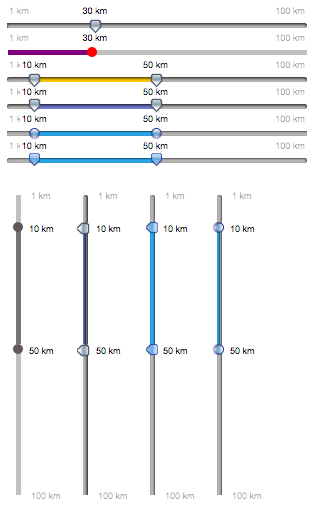
Demo
-------------
http://darul75.github.io/angular-awesome-slider/
http://jsfiddle.net/darul75/g9e9n8xc/
How to use it
-------------
You should already have script required for Angular.
```html
```
to the list above, you should add:
```html
```
```html
```
in case you want to use your own template, omit the last line and instead add some template code
to your project:
```html
```
Then, inject `angularAwesomeSlider` in your application module:
```javascript
angular.module('myApp', ['angularAwesomeSlider']);
```
and then just add an `input` with `slider` directive name attribute, `value` and `options` scope variable attribute.
```html
```
'value' your slider scope end value, as string.
'options' slider scope options value as json.
'ng-disabled' angular common attribute.
```javascript
$scope.value = "10";
// $scope.value = "10;15"; FOR DOUBLE VIEW
```
### Options
Options for your slider in json format {from:.....}
* `from`: start value
* `to`: end value
* `step`: step value
* `dimension`: string, example " $"
* `scale`: array for scale
* `round`: how many numbers allowed after comma
* `smooth`: true/false; false snaps the button to value
* `vertical`: true/false; vertical slider, default false
* `skin`: empty or 'blue' 'plastic' 'round'
* `css`: hash object, do not mix with 'skin' !
* `className`: custom class added to root slider DOM
* `realtime`: triggers changes and model update on every moves
* `threshold`: minimum distance allowed between 2 pointers, default both pointers overlap
* `limits`: true/false; toggles bounds labels visibility
* `modelLabels`: custom model for pointers labels based on pointer value
* `watchOptions`: default is 'true', watch this options changes by [equals](https://docs.angularjs.org/api/ng/function/angular.equals)
* `heterogeneity: array [percentage of point on slider]/[value in that point]

```
css: {
background: {"background-color": "silver"},
before: {"background-color": "purple"},// zone before default value
default: {"background-color": "white"}, // default value: 1px
after: {"background-color": "green"}, // zone after default value
pointer: {"background-color": "red"} // circle pointer
range: {"background-color": "red"} // use it if double value
}
````
* `callback` : function triggering current value, can be useful
```javascript
// example
callback: function(value, released) {
// useful when combined with 'realtime' option
// released it triggered when mouse up
console.log(value + " " + released);
}
```
* `scale` : model for slide scale
```javascript
// divide slider into parts
scale: [0, '|', 10, '|', 20, '|' , 30, '|', 40]
// or with some custom labels
scale: [{val:10, label:'low'}, {val:25, label:'middle'}, {val:30, label:'high'}]
```
* `modelLabels` : model for pointers labels by object or function
```javascript
// overrides default value label displayed combined with 'dimension' by an arbitrary label model
modelLabels: {1: 'top', 2: 'middle', 3: 'bottom'};
// or dynamicaly based
modelLabels: function(value) {
return 'my value is' + value; // momentjs external library call...
}
```
* `heterogeneity` : repartition of possible values
```javascript
// example here, first value is percentage of slider length, second is value
heterogeneity: ['50/100', '75/250'] // 50% value is 100, 75% value must be 250
```
Installation
------------
Using npm:
```
npm install angular-awesome-slider
```
Using bower:
```
bower install angular-awesome-slider
```
RELEASE
-------------
* 2.4.0: fix while updating both range values from code
* 2.3.9: callback not fired in case slider is on threshold values
* 2.3.8: bind to touch AND non touch events
* 2.3.7: heterogeneity option
* 2.3.6: watch options, fix threshold and click handler + date display testing.
* 2.3.5: do not remember
* 2.3.4: fix css regressions + modelLabels with function
* 2.3.3: details for modelLabels options + merge showLabels option
* 2.3.2: fix css pointer position + hover sking pointers background positions
* 2.3.1: fix from and to in floating values
* 2.3.0: new module name, no more ng-sorry-prefix, classname option, sass/scss support, scale object option
* 2.2.6: refactoring classnames
* 2.2.5: skin availables + less all css
* 2.2.4: fix when 2 pointers overlap on limits
* 2.2.3: mouse up event indicator in callback
* 2.2.2: default indicator display + visibility and move events
* 2.2.1: fix disable+default position css+decimal value on init value
* 2.2.0: handle from greater than to + gap pointer threshold option
* 2.1.9: fix labels positions while gluing, gap was too big + options changed watch by value
* 2.1.8: fix labels positions while gluing + realtime model changes option + ngDisable option fix
* 2.1.7: fix pointer position on click for double value
* 2.1.6: starting mocha tests
* 2.1.5: directive refactoring
* 2.1.4: fix overlap on labels
* 2.1.3: bug fixes, refactoring, inline options param
* 2.1.2: bug fixes, changes in z-index via CSS and not js
* 2.1.1: override css, colors...
* 2.1.0: bug fixes
* 2.0.0: no JQuery
### Build
You can run the tests by running
```
npm install
```
or
```
npm test
```
assuming you already have `grunt` installed, otherwise you also need to do:
```
npm install -g grunt-cli
```
### Issue
To help me on reproducing any issues, please feel free to modify/fork this fiddle: http://jsfiddle.net/darul75/b09m7183/
## Metrics
[](https://nodei.co/npm/ng-slider/)
## who's who
Who use it ? feel free add issue or edit readme with PR, to see how you use it and give some ideas, thx
[openenergygroup](https://www.openenergygroup.com/)
[google?](https://www.google.com)
## License
The MIT License (MIT)
Copyright (c) 2013 Julien Valéry
Permission is hereby granted, free of charge, to any person obtaining a copy
of this software and associated documentation files (the "Software"), to deal
in the Software without restriction, including without limitation the rights
to use, copy, modify, merge, publish, distribute, sublicense, and/or sell
copies of the Software, and to permit persons to whom the Software is
furnished to do so, subject to the following conditions:
The above copyright notice and this permission notice shall be included in
all copies or substantial portions of the Software.
THE SOFTWARE IS PROVIDED "AS IS", WITHOUT WARRANTY OF ANY KIND, EXPRESS OR
IMPLIED, INCLUDING BUT NOT LIMITED TO THE WARRANTIES OF MERCHANTABILITY,
FITNESS FOR A PARTICULAR PURPOSE AND NONINFRINGEMENT. IN NO EVENT SHALL THE
AUTHORS OR COPYRIGHT HOLDERS BE LIABLE FOR ANY CLAIM, DAMAGES OR OTHER
LIABILITY, WHETHER IN AN ACTION OF CONTRACT, TORT OR OTHERWISE, ARISING FROM,
OUT OF OR IN CONNECTION WITH THE SOFTWARE OR THE USE OR OTHER DEALINGS IN
THE SOFTWARE.